ClaudHub 2.0 OTOs are the optional upgrades that come after the $14.95 front end, and there are enough of them that it pays to read the list before you reach the payment page. ClaudHub 2.0 is a browser-based dashboard from Anirudh Baavra and Amit Gaikwad (Hyper SoftLabs) that, per the vendor, lets you use the latest Claude models from one screen for a one-time launch price. This guide goes through the order bump and every upgrade one at a time: what the vendor says each one adds, who it is for, who can skip it, and where the vendor’s own pages disagree. If you want the full product picture first, read our ClaudHub 2.0 review.
MMO Maker is an affiliate for ClaudHub 2.0 and earns a commission on purchases through our links, at no extra cost to you, in line with the FTC’s endorsement guidelines. That does not change what we write here. Everything about the product comes from the vendor’s own sales page, JV page, JV documentation and checkout pages, and we have not tested it hands-on.
The short answer on ClaudHub 2.0 OTOs
Buy the front end, use it for a week on real work, and only then look at upgrades. The front end is described by the vendor as the whole core app, it carries a 30-day refund, and none of the upgrades are needed for it to work. The one upgrade worth a serious look for heavy users is Unlimited Edition, because it is the one that removes daily limits. Everything else depends on what you actually do: templates, voiceovers and images, an agent, automation, or reselling.
That order matters because upgrade pages are written to feel urgent. A calm week with the front end tells you which limit, if any, is really in your way.
What the $14.95 front end already includes
Before paying for more, be clear on what you already get. From the vendor’s own feature list for the front end:
- Access to the Claude models the vendor lists (Opus 5.5, Fable 5.1, Sonnet 5 and Haiku 4.5, plus earlier versions) in one account.
- A multi-model chat workspace, so you can switch models and compare answers side by side.
- A built-in prompt engine with pre-loaded prompts for sales copy, emails, scripts, ads and funnels.
- Output refinement tools, a commercial license for client work, and new Claude releases added automatically, per the creators.
- Lifetime access on the launch offer, with no monthly fee for the core app.
One honest point: the vendor describes the capability as Pro, Max and Enterprise level. That is the vendor’s description of the models behind the app, and we have not tested the output. If you are comparing it with a monthly plan, our ClaudHub 2.0 vs Claude Pro comparison lays out what each route gives you.
The order bump: Business Upgrade at $9.95
At checkout the vendor offers a $9.95 order bump called the Business Upgrade. Per the sales page, it adds Turbo Claude models, a Premium Creation Dashboard and VIP 24/7 support.
Worth it if: you already know you want faster output and priority support, and under $10 is easy to justify. Skip it if: you are still not sure the product suits you. You can see how the front end feels first, and the bump is a small amount either way.
The ClaudHub 2.0 upgrades, one by one
The feature lists below come from the vendor’s JV documentation. Where the funnel graphic gives a matching price we show it. The rest of the prices are shown on each upgrade page inside the funnel, so check them there.
OTO 1: Unlimited Edition, $67
The vendor says this removes daily limits: unlimited content creation, unlimited use of the Opus, Sonnet and Haiku models and future models, unlimited long-form content and prompt runs, with commercial rights. Worth it if you generate content for clients all day and do not want to think about limits. Skip it if you have not yet hit a limit on the front end. Most people who start out will not know until they try.
OTO 2: DFY Edition, $47
Done-for-you templates for blog posts, social media, SEO articles, sales pages, email swipes, ad copy, funnels, ecommerce content and video scripts, plus an AI Article Wizard, a Smart AI Editor and an AI Rewriter. Worth it if you would rather pick a template and click generate than write prompts. Skip it if you are comfortable writing a clear prompt, since the front end already has a prompt engine.
OTO 3: Creative Studio
Per the JV document, this adds AI voiceovers, AI images for thumbnails and ads, PDF and document upload with summaries, and scripts and storyboards for video. Worth it if you make video, thumbnails or social graphics, not only text. Skip it if your work is mostly written, and you already have tools for images and voice.
OTO 4: ClaudHub Agent
An AI agent that plans and runs multi-step tasks (research, create, optimize, deliver) and builds funnels and campaigns from a goal. Worth it if you want to hand whole tasks to the AI instead of prompting step by step. Skip it if you like to control each step, because an agent works best when you can describe the finished result clearly and check it afterwards.
OTO 5: Financial Freedom System
Training and templates: service models, a client acquisition system, done-for-you offer templates, pricing strategies and an agency setup plan. Worth it if you want a structured plan for turning ClaudHub into a paid service. Skip it if you already know how you will find clients. Be careful with the name: no training can guarantee freedom or income, and the results depend on your effort and your market.
OTO 6: Enterprise
Unlocks every tool, adds a premium intelligence mode, maximum-speed processing, priority access to new features and a high-usage scalability mode. Worth it if you are a power user or run a team and want everything switched on. Skip it if you are one person doing a few hours of work a week.
OTO 7: Auto Flow Engine
Background automation: scheduled and trigger-based workflows, batch tasks and parallel workflows that run without you. Worth it if you publish on a regular schedule and want parts of it to run on their own. Skip it if you publish occasionally.
OTO 8: ClaudHub License (Reseller)
The right to sell ClaudHub itself, with done-for-you sales pages and video funnels, while the creators handle delivery and customer support. Worth it if you have an audience that would buy AI software from you. Skip it if you do not, because a reseller license does not bring you buyers.
OTO 9 and OTO 10: Agency License and Whitelabel License, $297 each
Both are listed in the JV document without a feature list. By name, the Agency License is for serving clients at agency scale, and the Whitelabel License is the right to sell the software under your own brand. Worth it if you run, or firmly plan to run, an agency or your own branded product. Skip them until the vendor shows exactly what each license includes, because a price with no feature list is not a decision you can make well.
Where the vendor’s pages disagree
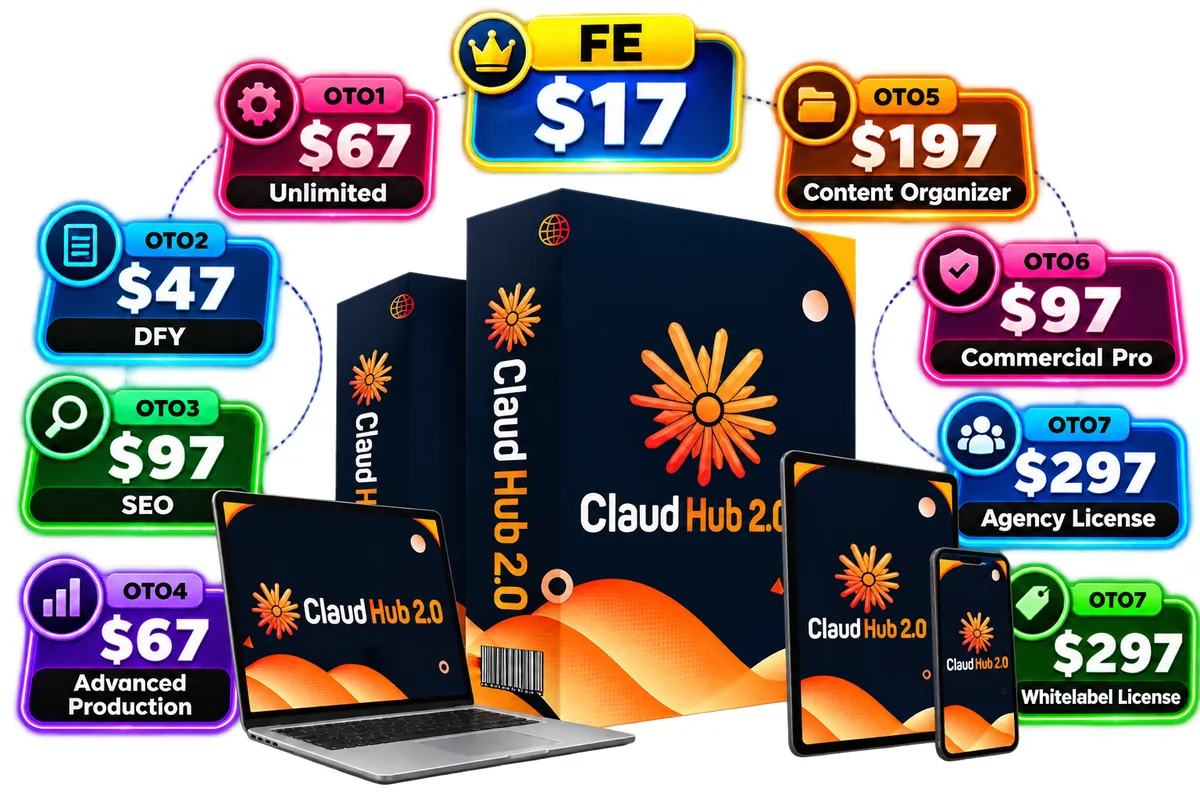
This is the part most OTO lists leave out. The funnel graphic on the JV page shows eight prices: Unlimited $67, DFY $47, SEO $97, Advanced Production $67, Content Organizer $197, Commercial Pro $97, Agency License $297 and Whitelabel License $297. The JV document describes a different set of upgrade names, including Creative Studio, Agent, Financial Freedom System, Enterprise, Auto Flow Engine and a Reseller license. Some names match, and some do not. The front end also differs: the live sales page and checkout showed $14.95, while the graphic shows $17.
What that means for you: do not trust a name or a price from a single page. Read each upgrade page inside the checkout, check the total before you click, and screenshot it. If you want a longer way to protect yourself, our guide to AI tools for making money online has a short checklist for reading launch pages.
For scale only, the eight prices on the graphic add up to $1,166. That is not what anyone should spend. It is a reminder that the front end is $14.95 and the funnel behind it is built to sell you far more.
Which upgrades fit which person
- A beginner who writes a little: front end only. Add the $9.95 bump only if you want faster output and support.
- A freelancer who writes for clients every day: front end first, then Unlimited Edition if you really hit daily limits, and DFY if templates would save you time.
- A creator who also makes video and images: front end, then look at Creative Studio and decide whether it replaces what you already pay for.
- Someone planning an agency: start with the front end, learn what you need, and only look at the Agency License once the vendor shows what it contains.

How to use the coupon codes
The JV documentation lists two codes: CLAUDVIP for 35% off the full funnel and CLAUDSPECIAL for $5 off. The sales page also mentions an early-bird code, CLAUD2, for $2 off. Percentages matter more on the larger prices, so on a $67 upgrade 35% is worth far more than $5. Apply the code before you check out and read the total on the checkout page, because the vendor’s pages do not always agree.
A code is a reason to compare, not a reason to buy. A discount on something you do not need is still money spent.
A simple buying order for ClaudHub 2.0 OTOs
- Buy the front end only, or the front end plus the $9.95 bump if faster output matters to you.
- Use it on real work for several days. Write down every time a limit or a missing feature slows you down.
- Match each note to one upgrade. If nothing in your notes points at an upgrade, do not buy it.
- Read the refund terms on the checkout page, and set a reminder before day 30 so you can decide with the refund still open.

The bottom line
ClaudHub 2.0 has a cheap front end and a long list of upgrades. The sensible path is boring: front end first, a week of real use, then one upgrade at a time and only if a real limit points at it. The upgrades that deserve the most scepticism are the ones priced at $297 with no feature list. The ones that deserve a fair look are the ones that remove a limit you can already name.
For the full picture of pricing, coupon codes, pros and cons and the vendor’s claims we could not verify, see our ClaudHub 2.0 review. More AI tool breakdowns are in our guide to the best AI tools for affiliate marketing.
ClaudHub 2.0 OTOs: frequently asked questions
How many ClaudHub 2.0 OTOs are there?
The vendor’s JV documentation lists ten upgrades after the front end, plus a $9.95 order bump at checkout. The funnel graphic on the JV page shows eight prices, and some of the names on it differ from the JV document, so treat the names as approximate and read each upgrade page before paying.
Do I need any upgrade to use ClaudHub 2.0?
No. The vendor describes the $14.95 front end as the complete core app: Claude model access, the multi-model chat workspace, the prompt engine, output optimization and a commercial license. Every upgrade is optional.
Which ClaudHub 2.0 upgrade is the most likely to matter?
Going by the vendor’s description, the first upgrade, Unlimited Edition at $67, removes daily limits. It only matters if you hit those limits. Use the front end first, then decide.
Which coupon code should I use?
The JV documentation lists CLAUDVIP for 35% off the full funnel and CLAUDSPECIAL for $5 off. The sales page also mentions an early-bird code, CLAUD2 for $2 off. A percentage discount is worth more on the larger upgrade prices, so check the total on the checkout page.
Can ClaudHub 2.0 guarantee income?
No. The vendor’s pages talk about client work and agency services, but no tool can guarantee clients or income. Judge it on what it helps you produce, not on what the sales page implies.
What is the refund policy?
The vendor states a 30-day, full refund on the sales page and the checkout page. Read the refund terms on the checkout page before you buy, and set a reminder before day 30.