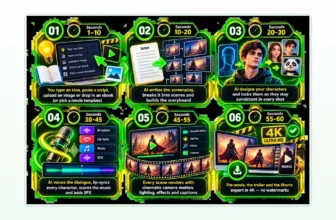
Every ViralToon AI OTO is optional, and the funnel is long enough that it is worth reading before you reach the payment page. ViralToon AI is a web app that, per its vendor Akshat Gupta, writes the script, storyboard, characters, animation, voiceover and music for a long cartoon from one idea. The front end is $14.94 at checkout, with a commercial license and a 30-day refund. After that comes a checkout add-on and seven upgrades. This guide explains each ViralToon AI OTO in plain English, using only what the vendor’s own pages say, and tells you who each one is for. We have not tested the product hands-on.
What the ViralToon AI front end already includes
Before you judge any ViralToon AI OTO, know what the $14.94 front end gives you. The vendor lists text-to-cartoon video, characters, stories, voiceovers and music in one dashboard, plus a commercial license. It also says the front end has limits on how many cartoons, projects and generations you can create, and the upgrades below are partly about lifting those limits. We could not verify the exact numbers, so ask support what the limits are before you pay for anything that removes them.
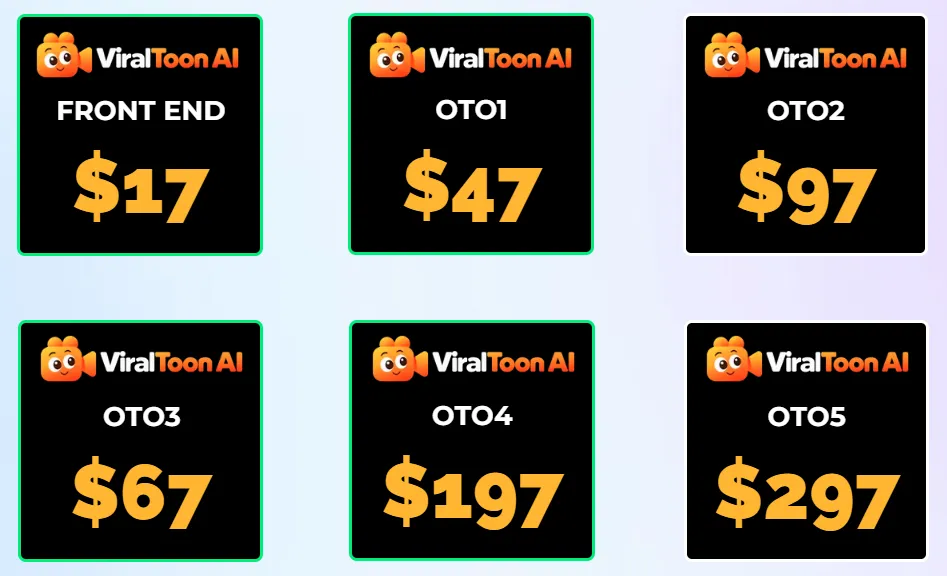
The price shown at checkout is the one that counts. The JV doc says $17 for the front end, the checkout page said $14.94 on launch day, and the upgrade prices also differ between sources in two places. None of that is a red flag alone, but it is a reason to read the checkout page closely.
The ViralToon AI OTOs at a glance
- Business Account (checkout add-on): $9, shown as $9.97 on the sales page.
- OTO 1, Unlimited: $67 (Gold) or $65 (Silver).
- OTO 2, Pro: $67 (Complete) or $65 (Basic).
- OTO 3, AI Workers: $97.
- OTO 4, AI Rankers: $47.
- OTO 5, Done For You Traffic: $37.
- OTO 6, Agency: $97.
- OTO 7, Whitelabel: $197.
These are the totals the vendor showed on its own checkout pages. You do not need any of them to start. For the full funnel, the coupon code and our pros and cons, see the ViralToon AI review.
Business Account: the checkout add-on
The checkout page describes the Business Account as faster video creation, VIP support and faster rendering with no waiting time. The sales page calls it the Business Edition and lists longer clips of up to 5 minutes, premium cartoon character and story templates, 4K HD renderings, more expressive voices and priority support. The two pages describe it differently, so read the checkout text before you tick it. It makes sense if you expect to make many episodes and render speed and support matter to you. If you are testing the idea with one video, you can skip it and decide later.
OTO 1: Unlimited (ViralToon AI)
The vendor says the front end limits how many cartoons, projects and generations you can create, and Unlimited removes those limits: text-to-cartoon, video length, characters, AI stories and storyboards, voiceovers, music, edits and regenerations, languages and commercial projects. This ViralToon AI OTO is the one most people will think about first, because it answers the obvious question of what happens when you reach the limit. Our advice is to hit the limit for real before you buy it. If you publish often and find the front end too tight in the first week, it is the upgrade that names your problem. If you make one cartoon a month, it is not.
OTO 2: Pro (ViralToon AI)
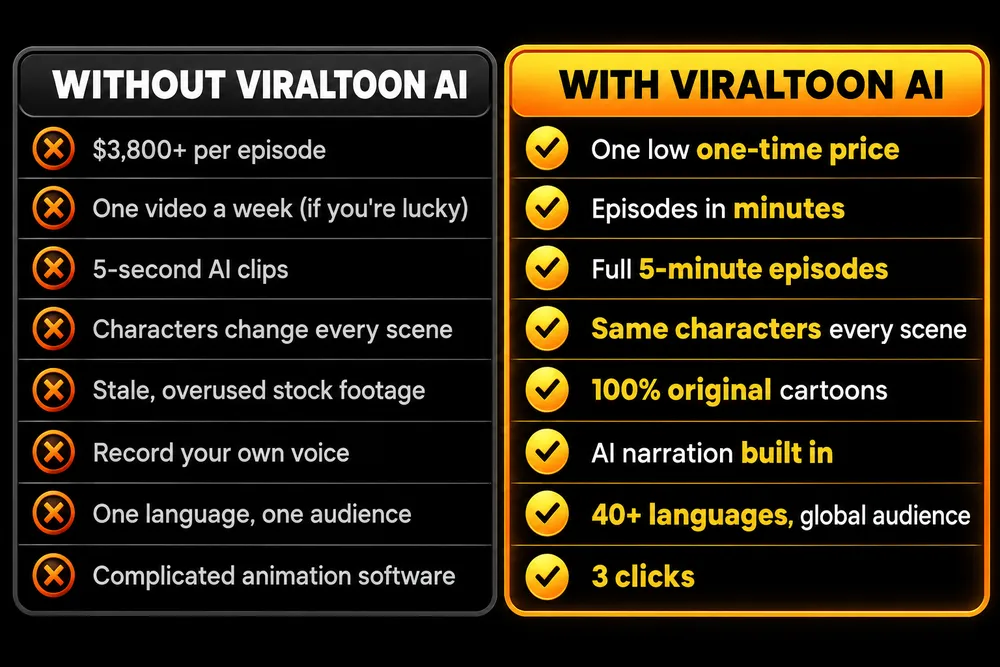
The upgrade page lists an AI cartoon series creator for multi-episode stories, cinematic character control, character consistency across a series, lip-sync with character voices, scene expansion, a viral content idea generator, long-form production and a commercial and client license. If you want to build a continuing series with the same characters instead of one-off videos, this is the upgrade that matches that goal. One thing we could not verify is how well the characters stay consistent across a full five-minute episode, so test that on the front end first and see how far it gets you.
OTO 3: AI Workers (ViralToon AI)
Per the upgrade page, AI Workers is a team of AI agents that creates marketing materials from a keyword or voice command: websites, funnels, email and SMS copy, images, videos, blog posts, voiceovers, music, courses, SEO and social posts. It is much broader than cartoons, and the page carries leftover names from a different product. It only makes sense if you also need general marketing content and the checkout page spells out exactly what the agents do. If your plan is a kids’ cartoon channel, this is not the upgrade that solves your problem.
OTO 4: AI Rankers (ViralToon AI)
The vendor says AI Rankers helps rank your videos on Google, Bing and Yahoo. The upgrade page makes big claims about ranking speed and earnings that we do not repeat, and no search tool can promise rankings. If you already understand video SEO and want a helper, you could consider it. If you do not, learn the basics first, because a tool cannot replace knowing what your audience searches for.
OTO 5: Done For You Traffic (ViralToon AI)
This is a traffic add-on at $37. The upgrade page promises extra daily profits, which we do not repeat, and the checkout page gives only the name. Before you buy any traffic product, ask how the traffic is delivered, where it comes from and what happens if it does not arrive. If the answers are not on the checkout page, wait.
OTO 6: Agency (ViralToon AI)
The vendor describes an agency license with unlimited customer accounts, your own admin panel, sales materials, and payments through PayPal, Stripe or a bank account. The page also carries a leftover product name. It is for people who want to resell ViralToon AI accounts as a service and already have customers to sell to. If you are still testing the tool for yourself, it is too early.
OTO 7: Whitelabel (ViralToon AI)
The last upgrade is a white label version you can name and brand as your own, which the vendor says it hosts for you, with a logo, domain setup and training. At $197 it is the most expensive step, and it only suits you if you want your own branded software business and are ready to support your own customers. For most buyers it is not a first-week decision.

How to decide on each ViralToon AI OTO
- Buy the front end only and make one real cartoon inside the 30-day refund window.
- Write down what actually blocked you: a limit, a missing feature, slow rendering, no way to get viewers. Only look at upgrades that name that exact problem.
- Message support before paying and ask, in writing, what the upgrade adds beyond the front end.
- Check the refund terms for the upgrade itself, not just the front end.
- Skip Agency and Whitelabel unless you already have customers waiting.
Questions to ask ViralToon AI support before any upgrade
- What can I not do on the front end that this upgrade lets me do?
- What are the limits on cartoons, projects and generations on the front end?
- Does this upgrade replace a front-end feature or add to it?
- Is it a one-time payment, and does it include updates?
- What are the refund terms for this upgrade?
Who needs which ViralToon AI OTO
If you are making a few cartoons to see whether the idea suits you, the front end is likely all you need. If you plan to publish a series on a regular schedule, compare Unlimited and Pro after a real test. If you want speed, look at the Business Account. The agency, white label, traffic and ranking upgrades are separate bets, and each one needs its own reason. Kids’ content also has its own responsibilities: write down your channel rules, such as the age band and what never appears on screen, and review every episode yourself before it goes live.
Frequently asked questions about ViralToon AI OTOs
How many OTOs does ViralToon AI have?
Seven upgrades after the front end, plus a checkout add-on called the Business Account. The vendor’s JV documentation and checkout pages list them with prices from $37 to $197.
Do I need any ViralToon AI upgrade to start?
No. The vendor sells the front end as a complete product with a commercial license and a 30-day refund. Treat every OTO as a decision for later, after you have used the front end on real work.
Are the ViralToon AI OTO prices consistent?
Not entirely. The front end is $14.94 at checkout but $17 in the JV doc, and the JV doc and the checkout page disagree on two OTO prices. Always read the total on the checkout page before you tick a box.
Which ViralToon AI upgrade is the most useful for a cartoon channel?
Going by the vendor’s descriptions, Unlimited removes the front-end limits and Pro adds the series tools such as character consistency. Whether you need either depends on the limits you actually hit, which we have not tested.
Can ViralToon AI guarantee views or income?
No, and neither can any other tool. The vendor’s pages carry earnings claims that we do not repeat. Judge the product on what it makes, not on what it promises.
Final word on ViralToon AI OTOs
ViralToon AI sells a clear idea at a low entry price, and the funnel is published openly. The honest way to handle it is to test the front end on real work first and treat every ViralToon AI OTO as a decision you can make later. For more AI tools reviewed the same way, see our guides to the best AI tools for affiliate marketing and the best AI tools for making money online, and read the full ViralToon AI review before you decide.
MMO Maker is an affiliate for ViralToon AI and earns a commission on purchases through our links, at no extra cost to you, in line with the FTC’s endorsement guidelines. That does not change what we write here. Everything about the product comes from the vendor’s own sales page, JV page, JV documentation and checkout pages, and we have not tested it hands-on.